The No-Nonsense Tech Guide for Beginners: What’s Truly Worth Your Money (And What to Skip)
Walking into an electronics store or browsing Amazon’s tech section can feel like entering a foreign country where everyone speaks a different language. Phrases like “refresh rate,” “terabytes,” “nits of brightness,” and “AI integration” are thrown around as if they are vital to your survival.
If you consider yourself a tech beginner, the marketing noise is overwhelming. You just want things to work. You want to connect with family, get your work done, and watch a movie without needing an IT degree to set it up.
The dirty little secret of the tech industry is this: You do not need most of what they are selling.
This guide cuts through the hype. We are going to focus on practical utility—tech that actually makes life easier versus tech that just complicates it.
The 3 Golden Rules of Beginner Tech Buying
Before we look at specific products, adopt this mindset. These three rules will save you thousands of dollars over your lifetime.
Rule #1: Buy for the life you have NOW, not your “fantasy life.” Don’t buy a $2,000 camera because you might take up National Geographic-level photography someday. Buy the tech that solves a problem you have today.
Rule #2: The “Friction Test.” Good tech removes friction from your life (e.g., helps you find keys faster, makes typing easier). Bad tech adds friction (e.g., requires constant updates, complex pairing processes, or daily charging for little reward).
Rule #3: Ignore “Pro” features. If a product has “Pro,” “Ultra,” or “Max” in the name, it is designed for the top 5% of power users. As a beginner, you will likely pay a 40% premium for features you will never turn on.
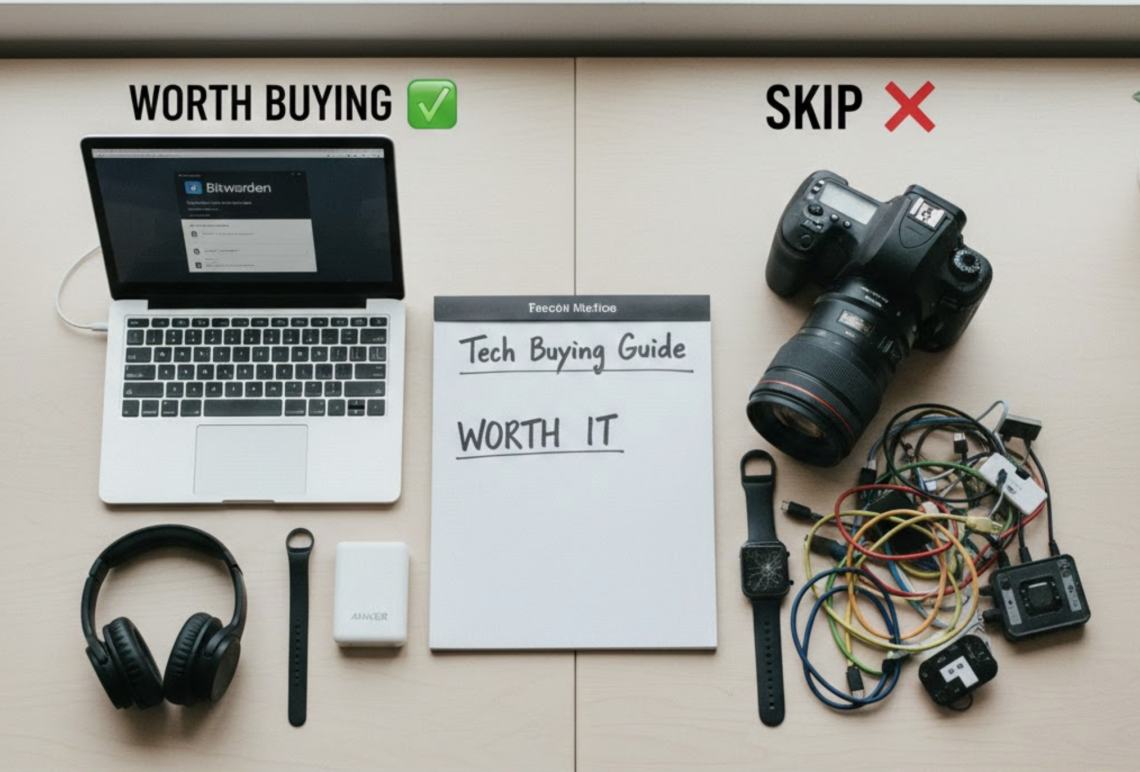
✅ The Essentials: What Is Worth Buying
These are the foundational items. They aren’t flashy, but they significantly improve your daily digital experience. Spend your budget here first.
1. A “Middle-Ground” Laptop or Quality Tablet
You don’t need a gaming beast, but don’t buy the cheapest junk on the shelf, either. Cheap laptops are slow and frustrating right out of the box.
- Worth Buying: Look for machines known for reliability and battery life rather than raw power. The MacBook Air (even older M1/M2 models) is the gold standard for “it just works.” For Windows, look for mid-range Dell XPS or Microsoft Surface laptops. For many beginners, a standard iPad with a keyboard case is actually better and simpler than a full laptop.
- The Benefit: A frustration-free experience for browsing, banking, emailing, and streaming.
2. Comfortable Noise-Canceling Headphones (or Earbuds)
The modern world is noisy. Whether you are working in a coffee shop, commuting, or just trying to focus at home, the ability to create quiet on demand is a superpower.
- Worth Buying: Prioritize comfort over audiophile sound quality. Brands like Bose and Sony dominate comfort. If you are in the Apple ecosystem, AirPods Pro are expensive but seamlessly integrated.
- The Benefit: Instant focus and much clearer phone calls.
3. A Password Manager
This isn’t a physical gadget, but it’s the single most important piece of tech you should own. Beginners often use the same password everywhere (a huge security risk) or write them in a notebook (inconvenient).
- Worth Buying: Services like Bitwarden (free option is great) or 1Password. They generate and store complex passwords for you. You only need to remember one master password.
- The Benefit: Massive security upgrade and no more clicking “Forgot Password” five times a week.
4. A Reliable Power Bank (Portable Charger)
Battery anxiety is real. A simple, brick-sized portable charger is low-tech peace of mind.
- Worth Buying: Get one from a reputable brand like Anker with at least 10,000mAh capacity. Don’t buy gas station cheapies; they can damage your phone.
- The Benefit: You never have to worry about your phone dying when you’re out and about.
❌ The “Skip List”: What to Avoid (For Now)
These categories are heavily marketed to beginners but often end up in the “drawer of guilt”—expensive things you rarely use.
1. High-End Smartwatches (e.g., Apple Watch Ultra, high-end Garmins)
Marketing suggests these will turn you into an athlete. The reality for most beginners? They use them to check texts (which is distracting) and count steps.
- Why Skip: You have to charge them daily, they constantly buzz at you, and most people abandon the complex health tracking after a month.
- Alternative: If you just want to track steps and sleep, get a simple, cheap fitness band (like a Fitbit Inspire or Xiaomi Band) that lasts a week on a charge.
2. Elaborate “Smart Home” Setups
Ads show people walking into a house, clapping their hands, and having the lights dim and Mozart play.
- Why Skip: Smart home tech is notoriously “fussy.” When the Wi-Fi goes down, you can’t turn on your lights. Different brands often don’t talk to each other easily. It requires constant troubleshooting.
- Alternative: Start with one simple Smart Plug for a lamp that is hard to reach. See if you actually like it before buying 20 smart bulbs.
3. DSLR or Mirrorless Cameras
Your phone camera is incredible. Seriously.
- Why Skip: Dedicated cameras are bulky, heavy, require expensive lenses, and you have to transfer the photos to a computer to edit and share them. Most beginners buy them for a vacation, use them for three days, realize they are a hassle to carry, and revert to their phones.
- Alternative: Learn to use the editing tools already on your smartphone.
4. Cheap Android Tablets or Knock-off Accessories
There is a temptation to save money by buying off-brand charging cables, super-cheap tablets on Black Friday, or $20 wireless earbuds.
- Why Skip: “Buy nice or buy twice.” Cheap tablets are agonizingly slow. Cheap cables break in a month (or damage your device). Cheap earbuds sound terrible and won’t pair correctly. The frustration is never worth the small savings.
Summary: Tech Should Serve You
The best technology fades into the background. It helps you do what you want to do, faster and easier. If you find yourself spending more time managing the device than enjoying the benefits, it’s not the right tech for a beginner.