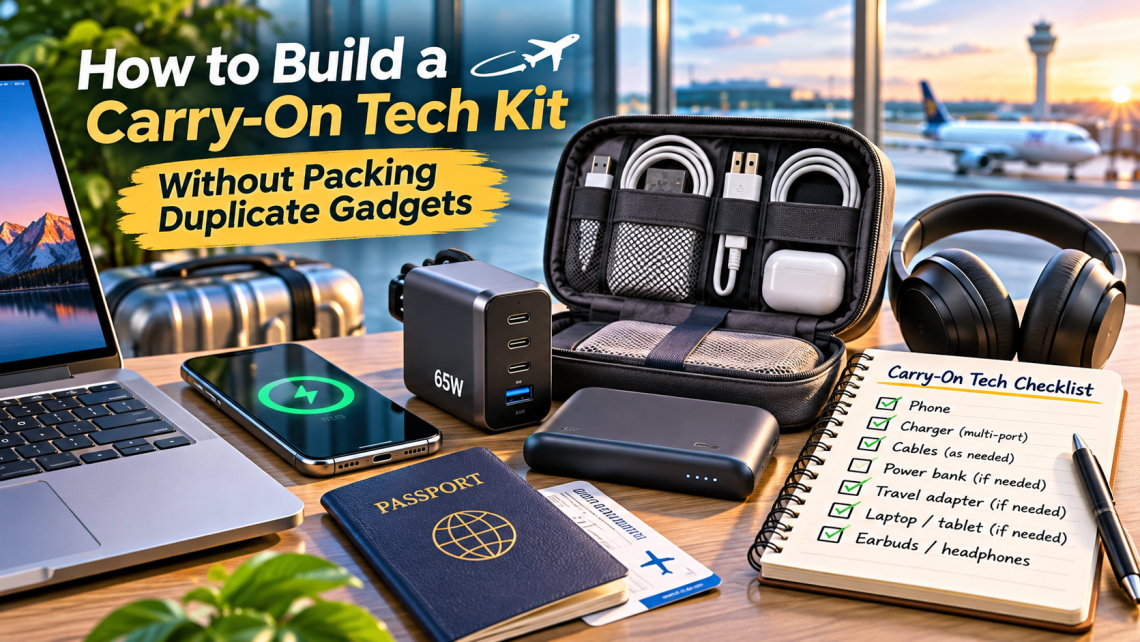
How to Build a Carry-On Tech Kit Without Packing Duplicate Gadgets
A smarter way to pack your phone, laptop, chargers, and travel accessories—without carrying three gadgets that do the same job.
You packed a laptop charger.
Then a phone charger.
Your carry on tech essentials should include a portable charger to ensure your devices remain powered throughout your travels.
Then a second phone charger, just in case.
Investing in quality carry on tech essentials can make a significant difference in your travel efficiency.
To avoid unnecessary weight, consider the carry on tech essentials that are most crucial for your trip.
You added a power bank, a universal adapter, two charging cables, wireless earbuds, and a pair of headphones.
And somehow, before you’ve even packed your clothes, your carry-on bag already feels heavy.
Include your carry on tech essentials in your travel checklist to ensure you don’t forget anything important.
Sound familiar?
The problem isn’t that travel technology is useless. It’s that many travelers pack devices individually instead of thinking about how those devices work together.
By focusing on your carry on tech essentials, you can streamline your packing and save space for other important items.
A well-planned carry-on tech kit should help you navigate, communicate, work, and stay charged without carrying unnecessary duplicates.
This guide is designed to help you identify your carry on tech essentials for seamless travel.
When preparing for your next adventure, make sure to include your carry on tech essentials. These carry on tech essentials will enhance your travel experience, keeping you organized and connected.
This guide takes a different approach from the usual list of must-have travel gadgets.
We’ll build a simple decision system, walk through three realistic travel scenarios, and show you what to pack, what to share, and what to leave at home.
Your Carry On Tech Essentials Checklist
Your carry on tech essentials can vary based on your destination and trip duration.
Before buying anything new, start with the technology you already own.
| Tech Essential | Main Purpose | Do You Always Need It? |
|---|---|---|
| Smartphone | Navigation, communication, tickets | Usually |
| Charging cable | Charging compatible devices | Yes |
| USB wall charger | Charging from an outlet | Usually |
| Power bank | Charging away from outlets | Depends on itinerary |
| Travel plug adapter | Connecting to foreign outlets | Depends on destination |
| Laptop or tablet | Work, entertainment, editing | Depends on trip |
| Earbuds or headphones | Audio, calls, entertainment | Optional |
| eSIM or roaming plan | Mobile connectivity | Depends on coverage |
| Cable organizer | Keeping accessories together | Optional |
The goal isn’t to pack every item in this table.
It’s to understand which functions your trip actually requires.
A traveler heading to Tokyo for sightseeing needs a different setup from someone flying to London for business meetings.
And neither necessarily needs the same electronics as a family taking a week-long vacation.
1. Start With Functions, Not Gadgets
Every item in your travel tech kit should solve a specific problem.
Instead of asking, “What gadgets should I bring?” ask these five questions:
How will I navigate?
For most travelers, a smartphone with maps and offline information is enough.
How will I communicate?
You may need mobile data, messaging, video calls, or access to work accounts.
How will I charge everything?
Think about wall outlets, battery capacity, charging cables, and compatibility.
How will I work or stay entertained?
A laptop may be essential for a business trip but unnecessary for a short vacation.
What happens if something stops working?
A sensible backup can be valuable. But carrying a second version of every accessory usually isn’t necessary.
The one-function rule
Give every gadget a clear job.
If two items perform the same job, decide whether the second one provides a meaningful benefit.
For example:
While packing, think about how each item in your carry on tech essentials will help you during your travels.
Focus on your carry on tech essentials when deciding what to bring for your next trip.
Remember that your carry on tech essentials should serve multiple purposes to maximize their utility.
- Two wall chargers may be unnecessary if one multi-port charger supports your devices.
- A tablet may be redundant if you already carry a laptop and smartphone.
- Two pairs of headphones may be unnecessary if one pair works for both calls and entertainment.
- Multiple plug adapters may be unnecessary if your charger includes compatible interchangeable plugs.
Shop&World Tip: A backup should protect you against a realistic problem—not become an excuse to pack everything twice.
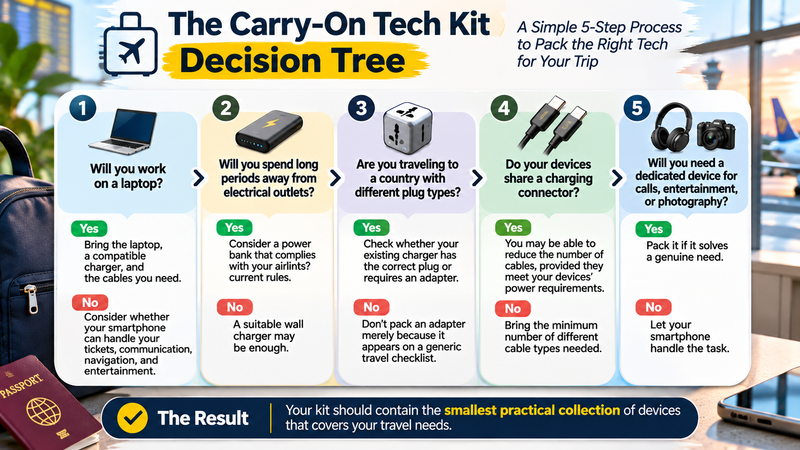
2. The Carry-On Tech Kit Decision Tree
Use this simple decision process before packing.
Question 1: Will you work on a laptop?
Your list of carry on tech essentials will help streamline your travel experience.
Yes: Bring the laptop, a compatible charger, and the cables you need.
No: Consider whether your smartphone can handle your tickets, communication, navigation, and entertainment.
Your carry on tech essentials should allow you to stay connected and productive during your travels.
Question 2: Will you spend long periods away from electrical outlets?
Yes: Consider a power bank that complies with your airline’s current rules.
No: A suitable wall charger may be enough.
As you evaluate your carry on tech essentials, ensure they align with your travel goals.
Question 3: Are you traveling to a country with different plug types?
Yes: Check whether your existing charger has the correct plug or requires an adapter.
No: Don’t pack an adapter merely because it appears on a generic travel checklist.
Question 4: Do your devices share a charging connector?
Yes: You may be able to reduce the number of cables, provided they meet your devices’ power requirements.
No: Bring the minimum number of different cable types needed.
Question 5: Will you need a dedicated device for calls, entertainment, or photography?
Yes: Pack it if it solves a genuine need.
No: Let your smartphone handle the task.
The result
Your kit should contain the smallest practical collection of devices that covers your travel needs.
Not the smallest collection at any cost.
The smallest collection that still works.
Evaluate your carry on tech essentials based on the specific demands of each trip.
3. Real Travel Scenario: A Five-Day Tokyo Vacation
Traveler profile: One person, five days, city sightseeing, public transportation, photography, and restaurant exploration.
What this traveler actually needs
Tokyo is a city where a smartphone can become an everyday travel assistant.
Maps, transit directions, translation, digital reservations, and photography all rely on the same device.
So the priority is keeping that smartphone useful throughout the day.
Recommended tech kit
| Item | Why It Earns a Place |
|---|---|
| Smartphone | Navigation, translation, tickets, photography |
| Compact power bank | Backup power during long sightseeing days |
| USB-C cable | Charging compatible devices |
| Compact wall charger | Overnight charging |
| eSIM or roaming plan | Connectivity away from Wi-Fi |
| Earbuds | Optional for flights and personal listening |
What we’d leave behind
A laptop, unless there’s a specific work requirement.
A tablet used only for occasional entertainment.
A separate digital camera, unless photography is an important part of the trip.
An extra charger that doesn’t add meaningful capability.
Why this setup works
The smartphone already performs several functions.
Adding more devices would increase charging needs, luggage weight, and the number of accessories to manage.
The power bank isn’t redundant with the wall charger: one provides portable stored energy, while the other charges devices from an outlet.
Traveler Talk: Tokyo visitors frequently discuss how much they rely on navigation and translation apps. Another practical consideration is planning for long days outside the hotel, when access to a convenient charging outlet isn’t guaranteed.
Shop&World Tip: Download supported offline maps and save your hotel address before departure. Your phone remains useful even if mobile connectivity becomes temporarily unavailable.
4. Real Travel Scenario: A Four-Day London Business Trip
Traveler profile: One person, four days, meetings, email, presentations, and occasional video calls.
This trip has a completely different technology priority.
The traveler needs reliable productivity rather than additional entertainment devices.
Recommended tech kit
| Item | Why It Earns a Place |
|---|---|
| Lightweight laptop | Work, presentations, documents |
| Smartphone | Communication, navigation, authentication |
| Multi-port USB-C wall charger | Charging compatible devices from one outlet |
| Suitable USB-C cables | Laptop and phone charging |
| UK-compatible plug | Connecting to local sockets |
| Earbuds with microphone | Meetings and calls |
| Power bank | Optional, based on time away from outlets |
The most important compatibility check
Can one charger safely and adequately power both your laptop and smartphone?
A multi-port charger can reduce clutter, but its advertised maximum wattage doesn’t necessarily apply to every port simultaneously.
Check the manufacturer’s power distribution table.
Also verify that your laptop supports the charging standard and power level provided by the charger.
What we’d leave behind
A separate phone charger if the multi-port charger already meets the need.
A tablet that duplicates the laptop’s functions.
A second set of headphones without a clear purpose.
Multiple international adapters when one compatible plug solution is sufficient.
Why this setup works
A business traveler needs a dependable charging system.
One suitable multi-port charger may replace multiple wall adapters, but the laptop’s charging requirements should determine the choice.
Traveler Talk: Business travelers often discover that a compact charger works perfectly with a phone but doesn’t provide enough power for a laptop during demanding work. Another frequent frustration is discovering that a charger fits the wall outlet only after buying an additional plug adapter.
Shop&World Tip: Test the complete laptop-and-phone charging setup at home before traveling. Don’t make your hotel room the first place you discover a compatibility problem.
For a deeper technical comparison, read our guide to Best Compact Travel Chargers for Multi-Device Trips.
5. Real Travel Scenario: A Seven-Day Family Vacation
Traveler profile: Two adults and two children, seven days, sightseeing, flights, and shared accommodation.
Family travel introduces a different challenge.
It’s not necessarily the number of devices.
It’s the number of people who need to charge them.
Recommended shared tech kit
| Item | Why It Earns a Place |
|---|---|
| Adults’ smartphones | Communication, navigation, reservations |
| One suitable multi-port charger | Shared charging at the accommodation |
| Compatible charging cables | Charging each device |
| Power bank | Optional backup for long outings |
| Children’s entertainment device | Optional for long journeys |
| Headphones | Personal listening without disturbing others |
| Destination-compatible plug solution | Connecting the charger safely |
What we’d avoid
A separate wall charger for every family member if one properly rated multi-port solution is sufficient.
Several tablets that are used only occasionally.
Duplicate entertainment devices with no clear need.
Too many charging cables that all serve the same purpose.
One important exception
Reducing duplicates shouldn’t create a single point of failure that would seriously disrupt the trip.
For example, a family relying on several phones for communication may reasonably carry a small backup charging option.
That’s different from packing unnecessary accessories out of habit.
Traveler Talk: Families often struggle with charging several devices overnight, especially in hotel rooms with limited convenient outlets. Another recurring issue is managing children’s entertainment without turning the carry-on into a bag full of screens and accessories.
Shop&World Tip: Assign one small pouch to shared charging equipment and make one adult responsible for checking it before each hotel checkout.
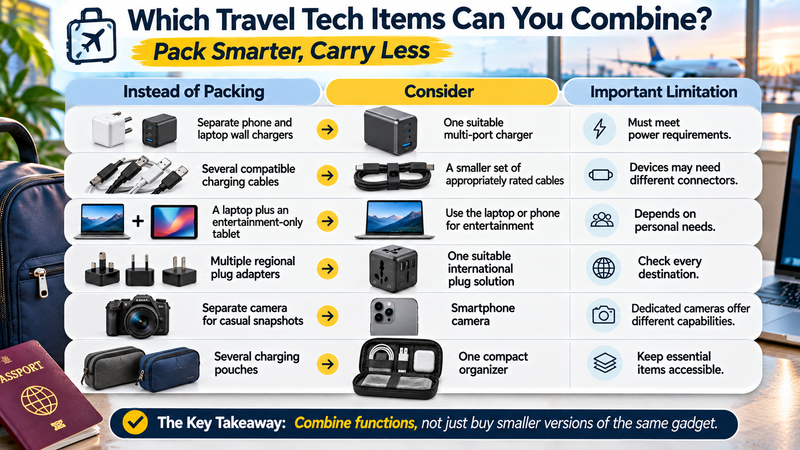
6. Which Travel Tech Items Can You Combine?
The biggest packing improvements often come from combining functions rather than buying smaller versions of everything.
| Instead of Packing | Consider | Important Limitation |
|---|---|---|
| Separate phone and laptop wall chargers | One suitable multi-port charger | Must meet power requirements |
| Several compatible charging cables | A smaller set of appropriately rated cables | Devices may need different connectors |
| A laptop plus an entertainment-only tablet | Use the laptop or phone for entertainment | Depends on personal needs |
| Multiple regional plug adapters | One suitable international plug solution | Check every destination |
| Separate camera for casual snapshots | Smartphone camera | Dedicated cameras offer different capabilities |
| Several charging pouches | One compact organizer | Keep essential items accessible |
This isn’t an argument against owning useful devices.
It’s a reminder that every additional gadget creates another item to carry, charge, protect, and potentially lose.
7. The Difference Between a Charger, Power Bank, and Travel Adapter
These three products are frequently confused.
They aren’t interchangeable.
Wall charger
Converts power from an electrical outlet into a suitable output for connected devices.
A multi-port model may charge several devices simultaneously, subject to its power-sharing limits.
Power bank
Stores electrical energy in an internal battery.
Useful when you’re away from wall outlets.
Power banks are subject to aviation safety restrictions, including rules on where they may be carried and applicable capacity limits.
Travel plug adapter
Allows a compatible electrical plug to connect to a different socket configuration.
It does not necessarily convert voltage.
Do you need all three?
Sometimes.
A traveler visiting multiple countries and spending long days outdoors may reasonably need a wall charger, power bank, and plug adapter.
But a traveler staying within a compatible electrical system and spending most of the day near outlets may not.
Shop&World Tip: Check the actual electrical input rating on your charger before using it abroad. Plug compatibility and voltage compatibility are separate considerations.
8. How Many Charging Cables Should You Pack?
There’s no universal perfect number.
A solo traveler carrying one smartphone may need only one cable, while a business traveler with a laptop and phone may prefer two.
A family will have different requirements.
The better approach is to count charging needs rather than devices.
Ask yourself:
- Which devices use USB-C?
- Which need a different connector?
- Which must charge simultaneously?
- Does my laptop require a higher-rated cable?
- Would one spare cable protect against a meaningful disruption?
Don’t overlook cable power ratings
Not every USB-C cable supports the same charging power.
For higher-power laptops, use a cable that meets the device and charger’s requirements.
A cable that works for basic phone charging may not support your laptop’s maximum charging performance.
Shop&World Tip: Label cables or use a simple organizer if several look identical but have different capabilities.
9. Carry-On Tech Safety: What to Check Before Flying
Reducing gadget clutter is useful, but safety comes first.
Power banks and spare batteries
Aviation rules generally restrict power banks and spare lithium batteries to cabin baggage, with additional capacity and quantity restrictions depending on the applicable rules.
Some airlines and jurisdictions have introduced stricter requirements.
For example, Singapore introduced a two-power-bank-per-passenger limit for departing flights effective April 15, 2026.
Always check your airline’s latest rules, including connecting and return flights.
Keep essential electronics accessible
Place your phone, travel documents, necessary medication, and important electronics where you can reach them.
Airport security procedures may require certain devices to be removed from bags.
Avoid damaged charging equipment
Don’t travel with cables showing exposed conductors, swollen batteries, or chargers with visible damage.
Be careful with universal adapters
A plug adapter doesn’t automatically make every appliance safe to use internationally.
Verify voltage compatibility and manufacturer instructions.
Shop&World Tip: Check battery restrictions before packing—not while standing at the airport security checkpoint.
10. The One-Pouch Carry-On Tech System
A simple organizer can make a small tech kit easier to manage.
But it doesn’t need to be expensive.
Choose a compact pouch that fits your actual accessories.
Suggested organization
Main compartment: Wall charger and necessary cables.
Small pocket: Earbuds, cable adapters, or other tiny accessories.
Separate accessible location: Power bank, if needed.
Personal item: Phone and travel documents.
Keeping your tech equipment together helps prevent small items from being left behind during hotel changes.
However, don’t bury anything you may need during the flight.
The hotel checkout test
Before leaving a hotel room, check:
- Wall outlets.
- Bedside charging areas.
- Desk and workspace.
- Tech organizer.
- Phone and laptop bags.
It takes less than a minute and may save you from leaving an important charger behind.
11. What Not to Buy for Your Carry-On Tech Kit
Not every travel problem needs a new product.
Before buying another accessory, check whether something you already own can perform the same job.
Avoid purchasing:
- An additional charger without checking your current charger’s capabilities.
- A universal adapter before confirming your destination’s plug requirements.
- A high-capacity power bank without reviewing airline restrictions.
- Multiple organizers for a very small collection of cables.
- A tablet solely because a generic packing guide recommends one.
- Premium charging cables without understanding the required power and connector specifications.
The most useful purchase may be the one you decide not to make.
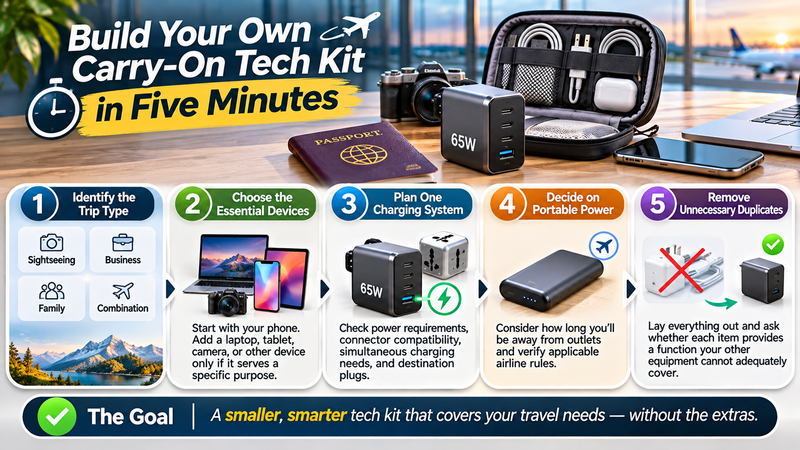
12. Build Your Own Carry-On Tech Kit in Five Minutes
Use this checklist before every trip.
Step 1: Identify the trip type
Is it primarily sightseeing, business, family travel, or a combination?
Step 2: Choose the essential devices
Start with your phone.
Add a laptop, tablet, camera, or other device only if it serves a specific purpose.
Step 3: Plan one charging system
Check power requirements, connector compatibility, simultaneous charging needs, and destination plugs.
Step 4: Decide whether portable power is necessary
Consider how long you’ll be away from outlets and verify applicable aviation rules.
Step 5: Remove unnecessary duplicates
Lay everything out and ask whether each item provides a function your other equipment cannot adequately cover.
If it doesn’t, consider leaving it at home.
Final Thoughts: A Better Travel Tech Kit Starts With Fewer Decisions
The best carry-on tech kit isn’t necessarily the smallest.
And it certainly isn’t the most expensive.
It’s the setup that handles your actual travel needs with the least unnecessary complexity.
For a Tokyo sightseeing trip, that may mean a smartphone, a compact charger, and a compliant power bank.
For a London business trip, it may mean a laptop, phone, and one properly rated multi-port charger.
For a family vacation, it may mean sharing charging equipment rather than carrying separate accessories for everyone.
The principle is simple:
By having your carry on tech essentials ready, you can focus more on enjoying your journey.
Pack one clear solution for each real problem. Add a backup only when it genuinely matters.
You’ll spend less time managing gadgets and more time enjoying the trip.
The right carry on tech essentials can enhance your travel experience significantly.
For a broader preparation guide, explore our International Travel Essentials checklist. For luggage organization, see Best Carry-On Accessories.
Your carry on tech essentials should be tailored to meet your unique travel preferences.
Frequently Asked Questions
What are the most important carry-on tech essentials?
Ultimately, investing in your carry on tech essentials can lead to a smoother travel experience.
For most travelers, a smartphone, suitable charger, necessary cables, and reliable connectivity are the starting point. Other items depend on the destination, trip duration, and activities.
Do I need both a power bank and a wall charger?
In summary, your carry on tech essentials are crucial for a successful trip, so choose wisely.
Not always. A wall charger uses an electrical outlet, while a power bank provides stored energy away from outlets. Travelers who spend long days sightseeing may benefit from both.
As you finalize your packing, make sure your carry on tech essentials are included to ensure a hassle-free journey.
Can one USB-C charger charge my laptop and phone?
Possibly. The charger must support the required power output and compatible charging protocols. Check its simultaneous port distribution and your devices’ specifications.
How do I avoid packing duplicate travel gadgets?
Identify each device’s main function, check where functions overlap, and remove items that don’t provide a meaningful additional benefit.
Should I bring a laptop and tablet on vacation?
Only if both serve distinct purposes. For many leisure trips, a smartphone may cover navigation, communication, and basic entertainment.
Are power banks allowed in carry-on luggage?
Power banks are subject to airline and aviation safety rules. They generally belong in cabin baggage rather than checked baggage, but quantity, capacity, and onboard-use restrictions vary. Check the rules for every flight.
Is a universal travel adapter necessary?
Only when your existing plugs aren’t compatible with the destination’s electrical outlets. Also check voltage compatibility because plug adapters don’t necessarily convert voltage.
Editorial note: Recommendations are based on practical travel scenarios and published technical requirements, not independent laboratory testing. Always verify airline restrictions and product compatibility before departure.
international travel essentials checklist
compact travel chargers for multiple devices
Staying organized with your carry on tech essentials can save you time and reduce stress.